
Feature
Self-service application kiosk
Self-service management solution for installing and uninstalling approved applications.
Request a demo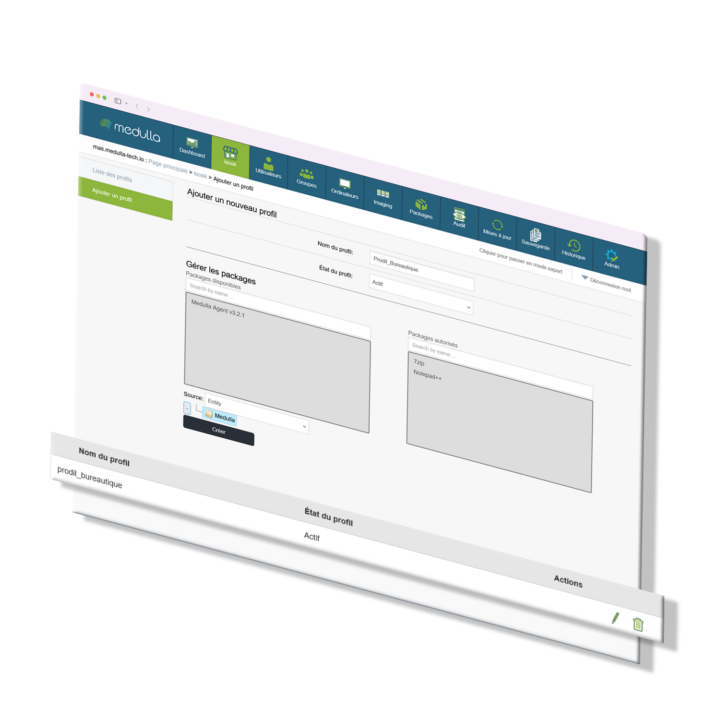
The application kiosk management solution transforms software management into an on-demand service. Designed to offer autonomy to users and efficiency to IT teams, it allows validated applications to be installed or uninstalled without administrative privileges, while maintaining total control from the Medulla console. Each user accesses a personalized catalog based on their group or profile.
All operations are tracked, centralized, and configurable by the administrator. Available as SaaS, Private Cloud, or OnPremise, this open source solution is used on more than 100,000 workstations. It enables greater agility without compromising security or compliance.

Fonctionnalités
Self-service application kiosk

Customizable application catalog
Each user sees a set of applications tailored to their profile, entity, or role.

Installation without administrator privileges
Users can install or uninstall applications without IT intervention, according to defined rules.

Traçabilité et supervision
All operations are logged: who installed what, when, on which machine.

Centralized rights and version management
Administrators define the available software, their versions, and the rules for updating or removing them.
Medulla > The steps
Admin configures the application catalog via the console.
User accesses the kiosk from their workstation.
He selects an application to install or uninstall.
The Medulla engine performs the operation without privilege escalation.
The action is automatically logged in the system logs.
Who is it for?
Self-service application kiosk
Software Publishers & Integrators
They reduce support requests by giving their internal or external customers more autonomy, while maintaining governance over the software deployed.
Small size and mid-size companies
They reduce support requests by giving their internal or external customers more autonomy, while maintaining governance over the software deployed.
Public institutions and Large Groups
The kiosk addresses the challenges of controlled delegation in large, distributed, or sensitive environments. It enables differentiated management according to entities while ensuring centralized traceability.
Self-service application kiosk > The benefits of the solution
Controlled user autonomy
Reduces support tickets while complying with security and compliance rules.
Time savings for IT
Technical teams are no longer required for every routine installation or update.
Customization and governance
Each entity can have its own catalog, with its own deployment and removal rules.
Security and auditability
No local privilege escalation. All actions are tracked, centralized, and exportable.
Compatible with all environments
Works on desktop, mobile, or remote devices, in conjunction with other Medulla modules.
Technical Specifications
- Compatible with Windows and Linux
- Local user interface, integrated with the Medulla agent
- Dynamic catalog based on user or machine groups
- Silent installation, no elevation of privileges required
- Version management, update and uninstall rules
- Complete logging (logs, actions, identifiers)
- API for synchronization with third-party CMDB or ITSM
- Deployment in SaaS, Private Cloud, or OnPremise
- Compliant with ISO 27001, ISO 27002, EUCS iPlus, and
- SecNumCloud standards (not yet certified)
- Works on more than 100,000 workstations
- Action retention policy configurable according to the organization